Settings reference
Every Workable Jobs setting explained: account connection, display and sync options, JobPosting schema fields, privacy consent, and spam protection keys.
Everything lives on Workable Jobs → Settings. Each setting is stored as a WordPress option
named wkjb_ plus the key shown below, so you can also read or set it with WP-CLI, for example
wp option get wkjb_apply_mode.
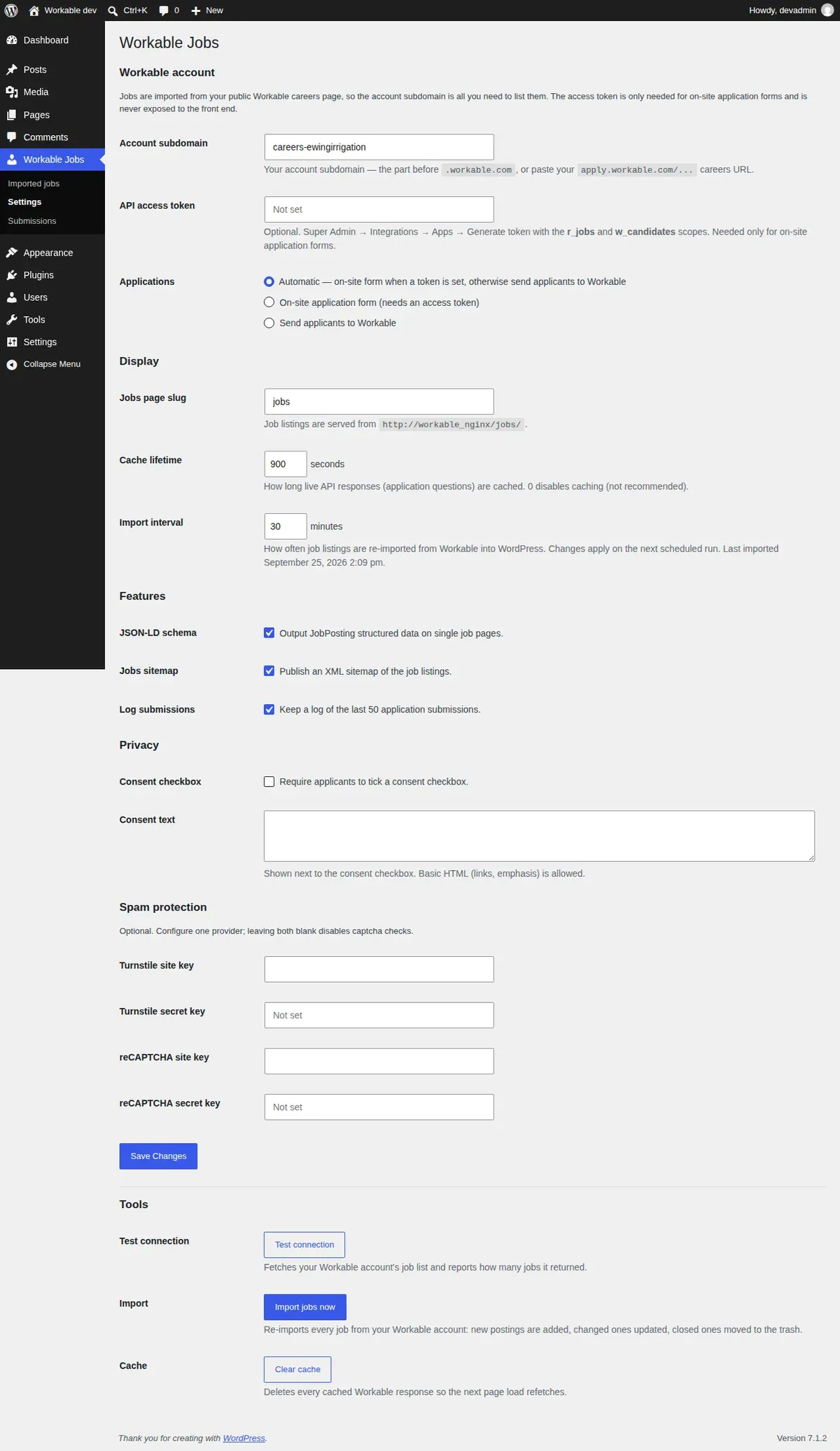
Workable account
| Setting | Option | Default | What it does |
|---|---|---|---|
| Account subdomain | wkjb_subdomain | empty | Your Workable account subdomain, such as acme. Pasting https://apply.workable.com/acme/ or acme.workable.com also works; the plugin keeps only acme. Required. Saving a new value checks it against Workable’s public careers feed: if Workable answers that no such account exists, the previous value is kept and the screen says so. A reachable value starts an import within about a minute. |
| API access token | wkjb_access_token | empty | Optional. Turns on on-site applications. Needs the r_jobs and w_candidates scopes. Once saved, the field shows dots instead of the token. Leave it blank to keep the saved token, or tick Remove to delete it. See Installation. |
| Applications | wkjb_apply_mode | auto | Where candidates apply. See the table below. |
Application modes
| Mode | Value | With a token | Without a token |
|---|---|---|---|
| Automatic | auto | On-site form | Apply on Workable button |
| On-site application form | form | On-site form | Apply on Workable button |
| Send applicants to Workable | redirect | Apply on Workable button | Apply on Workable button |
The on-site form always needs a token, so Automatic and On-site application form behave the same in 1.0. Choose Send applicants to Workable to keep a saved token but use Workable’s hosted form anyway.
Even in form mode, a job falls back to the Apply on Workable button when its form cannot be loaded, for example when Workable rejects the token or cannot be reached.
Display
| Setting | Option | Default | What it does |
|---|---|---|---|
| Jobs page slug | wkjb_jobs_page_slug | jobs | The address of the job list. With jobs, the list is at /jobs/ and each job at /jobs/{job-title}-{shortcode}/, where the shortcode is Workable’s 10-character job code. Changing it updates the addresses on the next page load. |
| Import interval | wkjb_sync_interval | 30 minutes | How often jobs are re-imported from Workable. Allowed range 15 to 1440 minutes. |
There is no cache setting. Job lists and job pages are read from your database, and each job’s
application form is cached for one hour (developers: filter wkjb_application_form_ttl).
Features
| Setting | Option | Default | What it does |
|---|---|---|---|
| JSON-LD schema | wkjb_enable_schema | on | Adds JobPosting structured data to each job page, for Google for Jobs. |
| Jobs sitemap | wkjb_enable_sitemap | on | Includes job pages in the WordPress XML sitemap, at /wp-sitemap-posts-wkjb_job-1.xml. Turn it off to leave them out. |
| Log submissions | wkjb_log_submissions | on | Keeps the last 50 application attempts under Workable Jobs → Submissions. |
Schema
Used in the JobPosting structured data when JSON-LD schema is on.
| Setting | Option | Default | What it does |
|---|---|---|---|
| Organization name | wkjb_organization_name | empty | The hiringOrganization name. Empty uses the company name from your Workable account. |
| Organization logo URL | wkjb_organization_logo | empty | Full URL of a logo image, added to hiringOrganization. Google for Jobs shows it next to your postings. |
| Job validity | wkjb_job_validity_days | 30 days | validThrough in the markup is the posting date plus this many days, from 1 to 365. Jobs stay listed until they close in Workable regardless; this only tells search engines how long the posting is expected to stay open. |
Privacy
| Setting | Option | Default | What it does |
|---|---|---|---|
| Consent checkbox | wkjb_enable_gdpr | off | Adds a required consent checkbox to the on-site application form. |
| Consent text | wkjb_gdpr_text | empty | The wording next to the checkbox. Links and basic formatting are allowed, so you can link your privacy policy. |
Spam protection
Configure one provider, or neither. With both blank, the form relies on its honeypot field and rate limit.
| Setting | Option |
|---|---|
| Turnstile site key | wkjb_turnstile_site |
| Turnstile secret key | wkjb_turnstile_secret |
| reCAPTCHA site key | wkjb_recaptcha_site |
| reCAPTCHA secret key | wkjb_recaptcha_secret |
reCAPTCHA must be a v3 key. Submissions scoring below 0.5 are rejected; the filter
wkjb_recaptcha_score_threshold changes that. Saved secret keys are not shown on the
settings screen; leave a secret blank to keep the saved one.
Tools
At the bottom of the Settings screen:
- Test connection fetches your Workable job list and reports how many jobs it returned.
- Import jobs now runs a full import: new jobs are added, changed ones updated, closed ones moved to the trash. It says so when an import is already running. Below the button, the panel shows the last import: when it ran and what changed, or Last import failed with the error, for example when the subdomain is wrong or Workable could not be reached.
- Clear cache deletes cached Workable responses, including cached application forms, so the next visit fetches them fresh. Use it after you change a job’s questions in Workable.
How the import works
- Every import fetches your public Workable job list once and compares it with the jobs already on your site.
- Each job is stored as a post of type
wkjb_job, listed under Workable Jobs → Imported jobs. Jobs are managed from Workable, so there is no “Add New” button. - A job that closes in Workable is moved to the trash. If it comes back, its page is restored at the same address.
- If Workable cannot be reached, or answers with an error, the import changes nothing. Your existing jobs stay up and the next scheduled run tries again.
- Imports run on WP-Cron, so on a site with very little traffic a run can start a little late.